


Wedding Invitation Card Maker
4.522.00 Reviews
App Specs
- Version
- 13.1.4
- Updated On
- License
- Free
- Downloads
- 1,000,000+
- Developer
- DOSA Apps
- Categories
- Events
- Platform
- Android, iOS
Screenshots
 Analysis by AppCompare
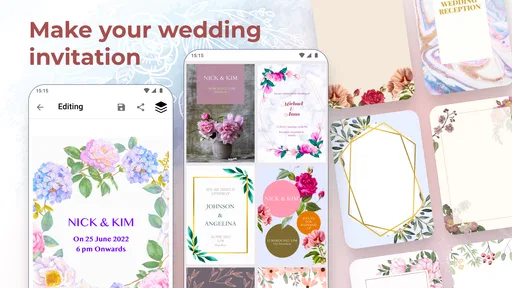
When wedding planning is already filling your evenings with decisions, making invitations can feel like one more task that needs to look polished. I find Wedding Invitation Card Maker most useful when the goal is to create a personal design without starting from a blank page or learning desktop design software. It puts the invitation itself at the center: choose a starting style, adjust it to suit the couple, and decide whether to share it digitally or prepare it for printing.
Readability and finding your way around
The first thing I notice is that the app is aimed at people who want to make an invitation, not study graphic design. Its interface is presented as approachable, and the template-first workflow gives a clear place to begin. That matters when two people are making decisions together: you can react to an existing layout instead of debating every font, color, and spacing choice from scratch.
A template is a useful shortcut, but it is still worth checking the finished invitation as a guest would read it. Names, dates, venue details, and any directions need to be easy to distinguish from decorative text. I would draft the wording before choosing a design, then review the whole card at a comfortable size. Decorative type may suit a romantic heading but can be a poor fit for practical details, especially for guests who have difficulty reading small or elaborate lettering.
There is also a sensible way to avoid turning customization into a long detour: settle the information first, then make visual choices. I would confirm spellings and venue wording with the other person involved before adjusting colors and fonts. That gives the design work a clear purpose and reduces the chance of repeatedly rebuilding an invitation because an important detail changed late in the process.
Motor and sensory considerations
Editing text, selecting styles, and adding a photo gives the couple room to shape the card, but these tasks still involve making visual choices and working through controls on a phone. If fine finger movement is uncomfortable, I would keep the design simple and make edits in deliberate passes rather than trying to perfect every detail at once. A larger screen may also be more comfortable for reviewing a layout, even if the actual work is done on a phone.
For sensory preferences, the strongest practical choice is often restraint. A busy background, decorative lettering, and a personal photo can all compete for attention; using fewer visual elements can make the invitation calmer and the essential information easier to find. I would ask someone who was not involved in making it to read the finished design. If they have to search for the date or venue, the card needs another pass.
When and where it fits
This is an Android app from DOSA Apps in the events category. It is free to install, rated for Everyone, and works on Android 6.0 or later. Its current version is 13.1.4; the average rating is 4.5 from around 13,000 ratings, and it has over a million installs. Those figures suggest a well-established option, though they do not tell me whether any one template will match your taste.
Worth Reading Before You Choose

Flipboard Shows What News Apps Must Do Beyond the Feed

Switching to Android Auto Means Rethinking Your Driving Routine

Google Calendar Makes a Crowded Week Easier to Manage

Ludo King Makes the Most of the Minutes Between Plans

Baby Panda World Brings Quick Play to Modern Phones, but Its Game Library Feels Busy

ESPN’s Live Game View Makes Following Close Games Easier
I can see it working especially well for a couple who wants to create a coordinated invitation at home, share a draft with family, and then make a final decision about digital sending or printed copies. It is also a practical option for someone arranging a small celebration who wants a designed card without hiring a designer. The app is free, but it offers in-app purchases ranging from $0.99 to $99.99 per item, so I would check the price of any paid item before committing to a particular design workflow.
For guests who rely on a screen reader or need high-contrast, carefully controlled layouts, I would not assume a visual invitation is enough on its own. Send the key details in plain text as well, or provide another accessible way to read them. A polished card can carry the mood of the event, while a text message or email makes the practical information easier to use in different circumstances.
Crafting Invitations with Ease
First things first, the Wedding Invitation Card Maker app is all about simplicity and creativity. When you open it, you’re greeted with a user-friendly interface that doesn’t intimidate, even if you’re not tech-savvy. The design is intuitive, making it easy to navigate through the features without feeling overwhelmed.
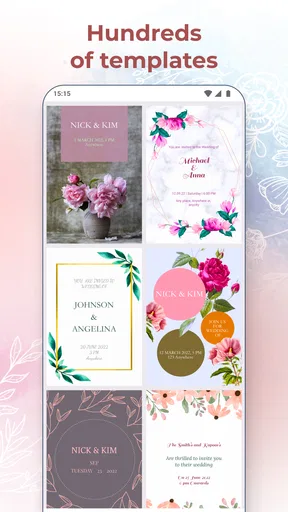
You start by choosing from a plethora of templates. Whether you're into classic, modern, or even quirky designs, there’s something for everyone. The templates are beautifully crafted, and you can tell a lot of thought has gone into making them versatile. The best part? They’re fully customizable!
A Personal Touch
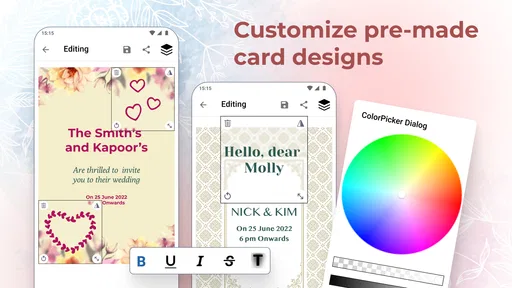
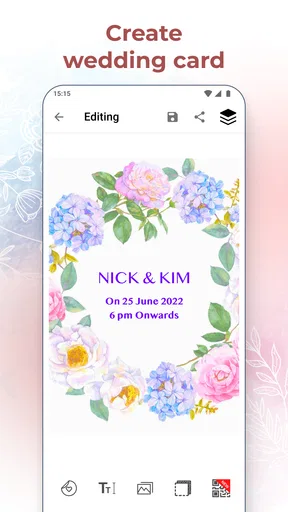
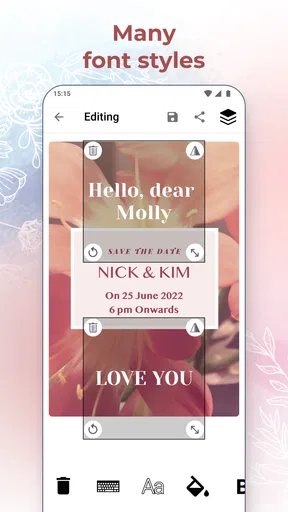
Once you've picked a template, the fun begins. You can tweak everything - from the font style to the color theme. The app lets you add personal touches like photos, which is fantastic if you want to include an engagement photo or a sweet snapshot of you and your partner. The text editing feature is quite robust, allowing you to play around with different fonts and sizes until you find the perfect look.
There’s also a handy option to include maps or directions to your wedding venue. It’s these little details that make the invitations not just beautiful, but also practical. You know, making sure Aunt Sally doesn’t get lost on her way to the venue!
Sharing and Printing Made Simple
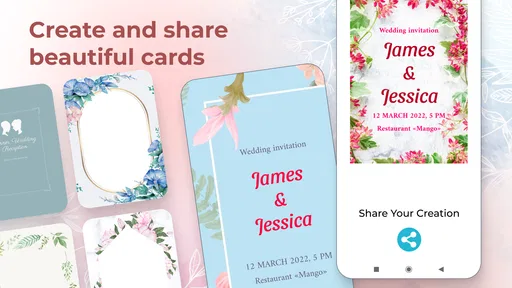
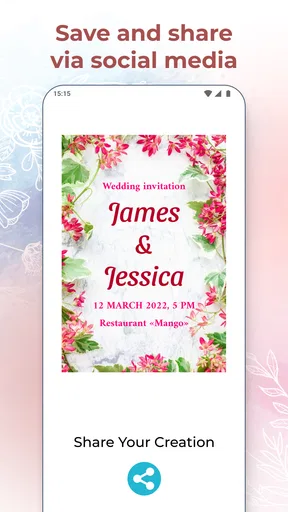
After you've poured your heart into designing the invitation, sharing them is a breeze. The app gives you multiple sharing options, whether you want to send digital invites via email or social media, or print them out for a more traditional touch. The print quality is impressive, capturing all the details you've meticulously placed on your design.
One feature that really stands out is the ability to download your invitation in various formats. It’s a lifesaver if you’re working with a professional printing service or if you just want to keep a digital copy for your wedding scrapbook.
Making a draft work in real life
A useful way to handle a real invitation is to treat the first version as a proof, not the final card. I would put the full wording in place, add the venue information, and then send a draft to the partner or family member who is most likely to spot a missing detail. This catches practical problems before anyone shares or prints copies. It also helps when relatives have different preferences: one person can focus on whether the information is complete, while another can judge whether the look feels right for the event.
Consider a couple planning from separate homes. One person can create a draft after work, share it for feedback, and revise it before sending invitations to guests. If the venue is unfamiliar, the map or directions can make the card more useful than a decorative announcement alone. I would still check the directions outside the design process and make sure the written address is clear; a visual map should support the location details, not replace them.
Choosing between an app, a template, and a designer
Compared with making a card from scratch in general-purpose design software, a wedding invitation maker has a more direct purpose: templates help narrow the choices, and wedding-specific details such as venue directions fit naturally into the task. That can save time for couples who want a good-looking result without learning a full design tool. The trade-off is that a template-led process may feel limiting if you already have a precise layout in mind or need strict control over every design detail.
A printable template from a document or design service can be a better fit if you prefer working on a computer, need to make careful adjustments with a mouse, or want to compare several versions side by side. A professional designer makes more sense when the invitation must follow a highly specific visual brief, or when matching other printed materials exactly matters more than doing the work yourself. I would choose this app for a personal, uncomplicated design; I would not choose it as a substitute for specialist print preparation when the job has demanding production requirements.
Small workflow choices that prevent rework
One non-obvious time saver is to decide early whether the invitation is mainly for a phone screen or for printing. A design that feels attractive on a phone may need a second look on paper, where fine text and color choices can behave differently. Before sending a large batch to a printer, I would inspect a sample or ask the print provider what file format and dimensions they need. The app supports downloading in different formats, but matching the provider’s requirements is still a separate step.
I would also keep a clean copy of the wording outside the design while planning. That makes it easier to correct names, times, or venue details without relying on memory, and it gives the couple a reliable text version to send to guests who prefer not to use an image. The invitation can then remain the attractive presentation layer, rather than becoming the only place where essential details exist.
There is a balance to strike with photos, too. A couple’s picture can make the card feel unmistakably theirs, but it should not make the event details harder to read. I would test the photo with the chosen text colors and move toward a simpler composition if the words compete with the image. For a guest list with varied ages and visual needs, clarity is a more useful finishing touch than adding one more decorative element.
Who will appreciate it—and who may not
The app is a good match if you want a wedding-themed starting point, enjoy making a few personal changes, and expect to share the result digitally or arrange printing yourself. It can also suit couples who need to coordinate opinions without paying for a fully custom design. Because it is free to install but includes paid items, I would begin by exploring what is available before building a plan around a particular paid option.
I would look elsewhere if you need a completely bespoke layout, want detailed desktop controls, or would rather have someone else manage proofing and print specifications. It may also be the wrong primary tool if accessibility depends on a carefully structured text document or screen-reader-friendly content. In that situation, I would use the invitation image as a visual extra and send the important information in a readable message as well.
Why It’s Worth Trying
Using the Wedding Invitation Card Maker app feels like having a graphic designer at your fingertips, minus the hefty price tag. It’s perfect for couples who want to maintain control over their wedding aesthetics without the stress of learning complex design software.
Most importantly, it allows you to inject your personality into every invite, ensuring your guests get a sneak peek of the amazing celebration that awaits them. Plus, you can make as many edits as you like without incurring extra costs, which is a huge bonus if you're prone to changing your mind like I am!
In a nutshell, if you want to create stunning, personalized wedding invitations without breaking a sweat, give this app a shot. It’s a delightful blend of creativity and functionality that makes wedding planning just a tad easier. Trust me, you’ll be sending out those invites with a big smile on your face.
My inclusive verdict
What I value most is the combination of a guided starting point and room to personalize the result. Templates, editable text, photos, venue directions, and sharing options give a couple practical ways to make one invitation feel suited to their celebration. The interface is described as approachable, but a visually simple editing experience is not the same as meeting every access need; I would still check the final card from the point of view of guests who read differently or use assistive tools.
My recommendation is to try it when you want a convenient, personal invitation and are comfortable reviewing the finished design carefully. Keep the wording readable, verify the location information, and share essential details in plain text when that helps guests. If you need extensive design control or a fully accessible text-first invitation, another workflow will serve you better. For everyone else, this is a practical place to turn wedding details into a card that feels personal without making the design process the main event.
Pros
- Easy-to-use interface for beginners.
- Wide variety of templates available.
- Customizable fonts and colors.
- Supports high-resolution exports.
- Integrates with social media easily.
Cons
- Limited free features available.
- Occasional in-app ads can be intrusive.
- Some templates are outdated.
- Requires internet for full functionality.
- No direct print options in-app.
FAQs for Wedding Invitation Card Maker
What features does the Wedding Invitation Card Maker offer?
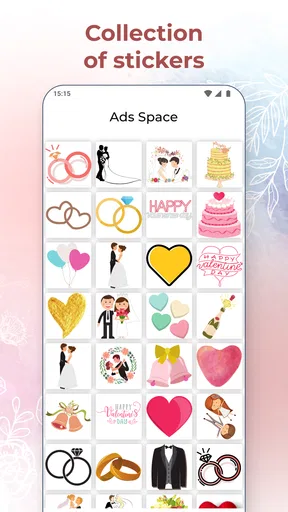
The Wedding Invitation Card Maker provides a variety of templates to suit different themes and styles, from classic to modern. Users can customize text, colors, and fonts to create personalized invitations. The app also supports adding photos and decorative elements like stickers and borders. Additionally, it allows easy sharing via social media and email.
Is the Wedding Invitation Card Maker user-friendly for beginners?
Yes, the app is designed with an intuitive interface that makes it accessible for users of all skill levels. It offers step-by-step guidance throughout the design process, ensuring that even those with no prior graphic design experience can create professional-looking invitations effortlessly. Tutorials and tips are also available within the app.
Can I use my own images in the invitations?
Absolutely! The Wedding Invitation Card Maker allows users to upload their own images, which can be incorporated into the design. This feature is perfect for adding personal touches, such as engagement photos or family portraits, to create unique and memorable invitations that truly reflect the couple's style and story.
Is there a cost associated with using the app?
The Wedding Invitation Card Maker offers both free and premium versions. The free version includes basic templates and features, while the premium version provides access to a wider range of templates, advanced customization options, and an ad-free experience. Users can choose the option that best suits their needs and budget.
Does the app support multiple languages for international invitations?
Yes, the app supports multiple languages, enabling users to create invitations in various languages to cater to international guests. This feature is particularly beneficial for multicultural weddings, allowing couples to communicate effectively with all invitees. The app's settings can be adjusted to accommodate different languages easily.


